Spatial data


Juan C. Rocha

Options

Attribute Desktop GIS (GUI) R
Home disciplines Geography Computing, Statistics
Software focus Graphical User Interface Command line
Reproducibility Minimal Maximal

GIS

  • QGIS
  • GRASS
  • SAGA
  • ArcGIS

They don’t work in isolation: API interfaces, and libraries / packages that enable interacting between programming languages (e.g. Rccp, reticulate, GDAL, GEOS)

Source: Lovelace, 2022

Some history

R is a language, has history, dialects and is evolving

  • 1993: R was created and inherited many of the capabilities (including spatial packages) from the S / S-plus language.
  • 2000s: point pattern analysis, geostatistics, exploratory spatial data, spatial smoothing and interpolation, spatial econometrics (spatial, sgeostat, splancs, akima, geoR, spatstats)
  • 2010s: spatial autocorrelation spdep, compatibility with ESRI shape files maptools, handling coordinate referece systems rgdal, sp: interfaces with GDAL and PROJ libraries important today. gstat for spatio-tempral statistics, geosphere for spherical trigonometry, adehabitat for analysis of habitat selection in animals.
  • sp: distinguishes spatial data from non-spatial objects, stores bounding box, CRS, but does not work well with raster.
  • rgeos geometry operations (e.g. intersection)
  • raster -> terra: map algebra, large out-of-memory datasets (interface with PostGIS)
  • APIs: GRASS, spgrass6 rgrass7, RSAGA, RPyGeo, RQGIS, rqgisprocess
  • Visualization: sp, RGoogleMaps, ggmap, ggplot2, rasterViz, tmap, leaflet, rayshader, mapview
  • 2020: sf and terra actively developed. stars handles vector and raster data cubes, lidR processes airborne LiDAR (light detection and ranging) point clouds. rgdal, rgeos and maptools to be retired by end of 2023.

Source: Lovelace, 2022 (Chapter 1)

Spatial data

Which one depens on your research question and data available

Vector

  • Represents the world with points, lines and polygons
  • Discrete well defined borders
  • High precision (but not necessarily accuracy)
  • Common in social sciences: e.g. administrative units

Most common packages today are sf and terra respectively

Vector

sf: simple features is an open standard endorsed by the Open Geospatial Consortium.

  • GDAL: reading, writing many data formats
  • PROJ: coordinate system transformations
  • GEOS: planar geometry (e.g. buffers, centroids)
  • S2: spherical geometry

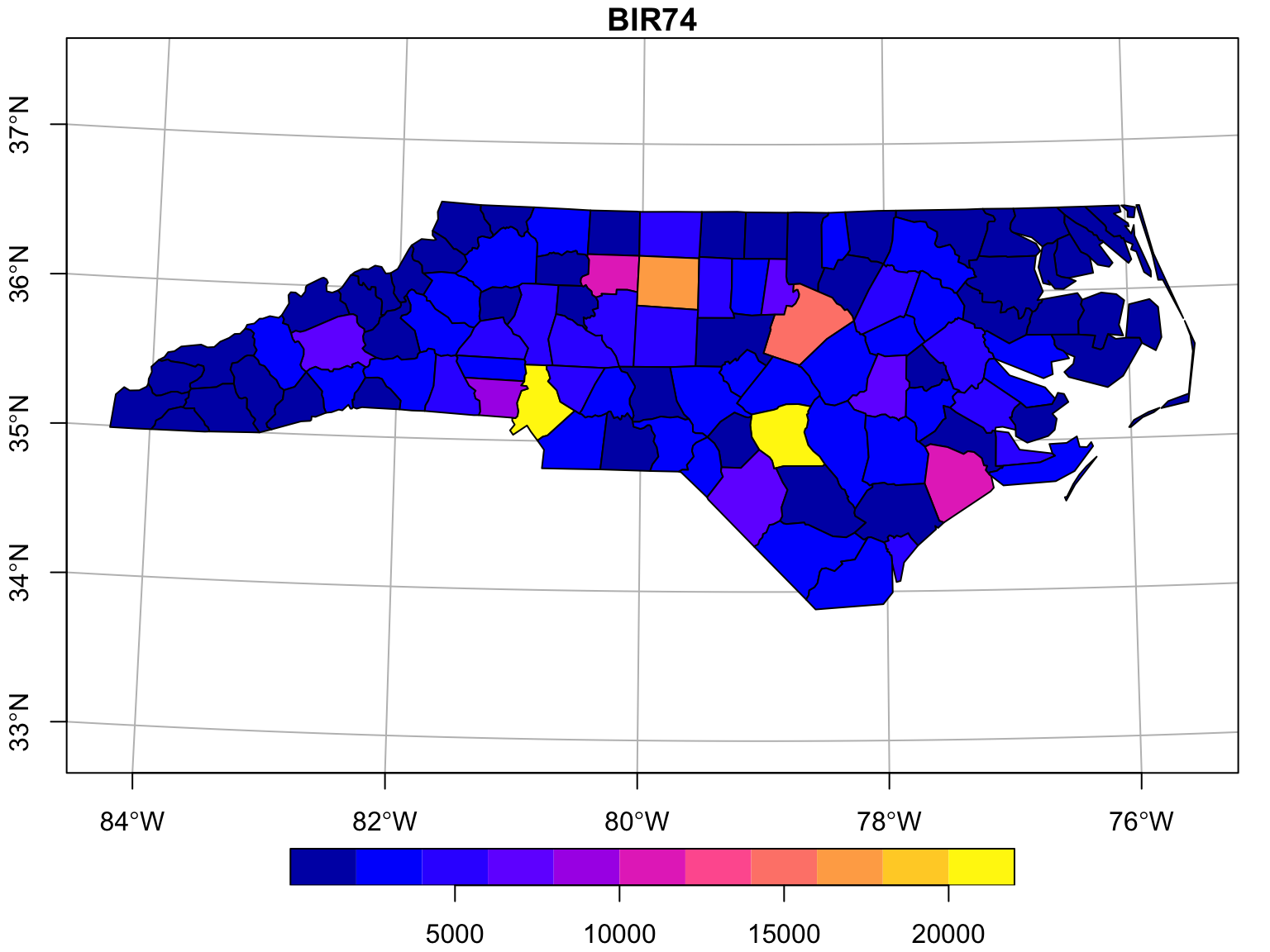
BIR74 is birth counts over the region (North Carolina)

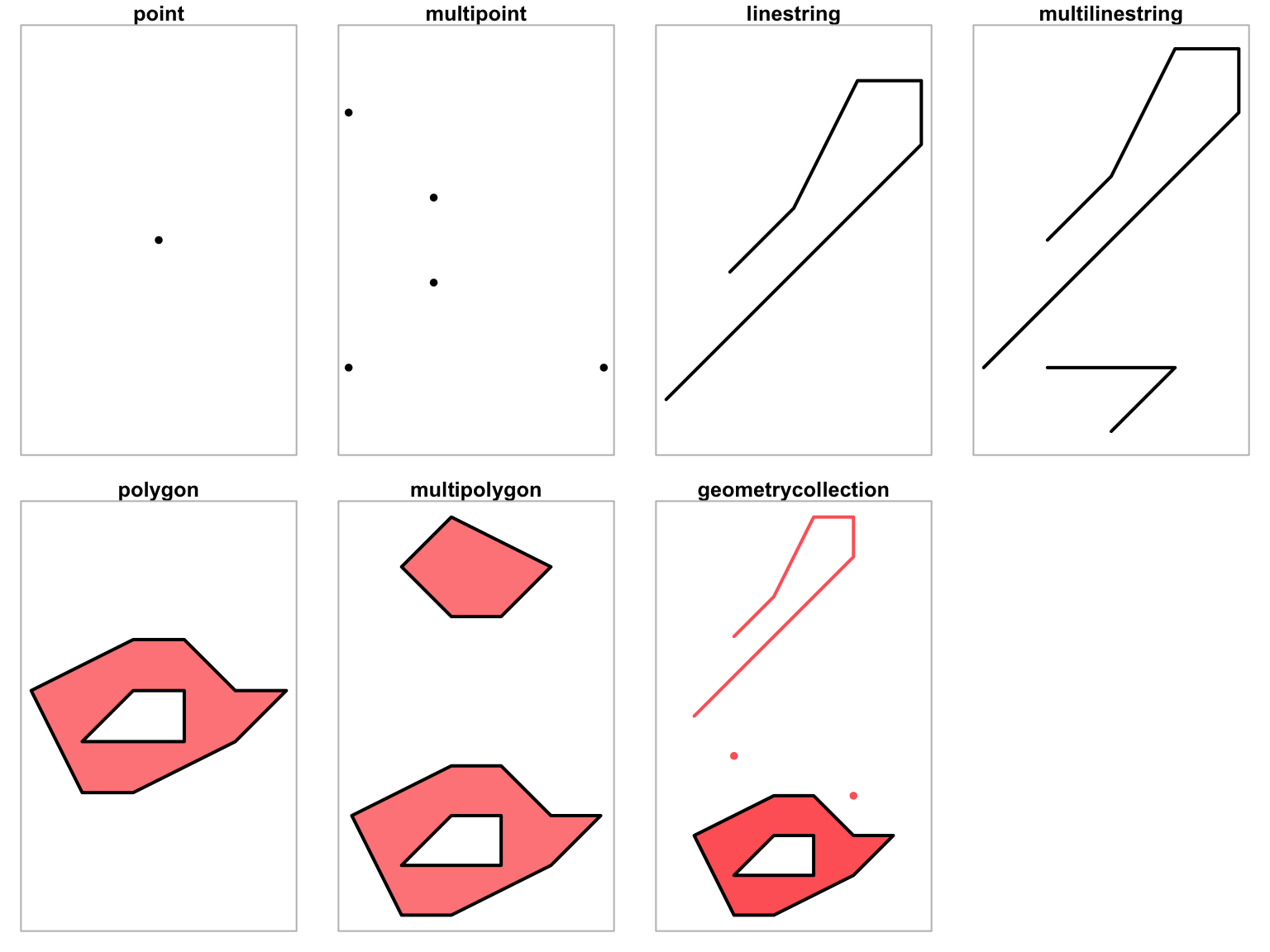
Data types: Geometries

type description
POINT single point geometry
MULTIPOINT set of points
LINESTRING single linestring (two or more points connected by straight lines)
MULTILINESTRING set of linestrings
POLYGON exterior ring with zero or more inner rings, denoting holes
MULTIPOLYGON set of polygons
GEOMETRYCOLLECTION set of the geometries above

  • x and y coordinates (usually longitude and latitude)
  • z = altitude, m = measurement

Source: Pebesma, 2022 (Chapter 3)

How does it look in R?

nc.32119
Simple feature collection with 100 features and 14 fields
Geometry type: MULTIPOLYGON
Dimension:     XY
Bounding box:  xmin: 123829 ymin: 14744.69 xmax: 930521.8 ymax: 318259.9
Projected CRS: NAD83 / North Carolina
# A tibble: 100 × 15
    AREA PERIMETER CNTY_ CNTY_ID NAME   FIPS  FIPSNO CRESS…¹ BIR74 SID74 NWBIR74
 * <dbl>     <dbl> <dbl>   <dbl> <chr>  <chr>  <dbl>   <int> <dbl> <dbl>   <dbl>
 1 0.114      1.44  1825    1825 Ashe   37009  37009       5  1091     1      10
 2 0.061      1.23  1827    1827 Alleg… 37005  37005       3   487     0      10
 3 0.143      1.63  1828    1828 Surry  37171  37171      86  3188     5     208
 4 0.07       2.97  1831    1831 Curri… 37053  37053      27   508     1     123
 5 0.153      2.21  1832    1832 North… 37131  37131      66  1421     9    1066
 6 0.097      1.67  1833    1833 Hertf… 37091  37091      46  1452     7     954
 7 0.062      1.55  1834    1834 Camden 37029  37029      15   286     0     115
 8 0.091      1.28  1835    1835 Gates  37073  37073      37   420     0     254
 9 0.118      1.42  1836    1836 Warren 37185  37185      93   968     4     748
10 0.124      1.43  1837    1837 Stokes 37169  37169      85  1612     1     160
# … with 90 more rows, 4 more variables: BIR79 <dbl>, SID79 <dbl>,
#   NWBIR79 <dbl>, geom <MULTIPOLYGON [m]>, and abbreviated variable name
#   ¹​CRESS_ID

How does it look in R?

nc.32119 |> 
    select(NAME, AREA, BIR74)
Simple feature collection with 100 features and 3 fields
Geometry type: MULTIPOLYGON
Dimension:     XY
Bounding box:  xmin: 123829 ymin: 14744.69 xmax: 930521.8 ymax: 318259.9
Projected CRS: NAD83 / North Carolina
# A tibble: 100 × 4
   NAME         AREA BIR74                                                  geom
   <chr>       <dbl> <dbl>                                    <MULTIPOLYGON [m]>
 1 Ashe        0.114  1091 (((387344.8 278387.2, 381334.2 282773.7, 379438.2 28…
 2 Alleghany   0.061   487 (((408601.8 292424.5, 408565.1 293985.3, 406642.9 29…
 3 Surry       0.143  3188 (((478717.1 277490.3, 476935.7 278867.1, 471502.7 27…
 4 Currituck   0.07    508 (((878193.9 289128.3, 877381.5 291117.1, 875993.9 29…
 5 Northampton 0.153  1421 (((769835.3 277796.1, 768364.4 274841.8, 762615.8 27…
 6 Hertford    0.097  1452 (((812328 277876.4, 791158.2 277011.9, 789882.3 2775…
 7 Camden      0.062   286 (((878193.9 289128.3, 883270.9 275314.1, 881180.4 27…
 8 Gates       0.091   420 (((828444.6 290095.5, 824767.5 287166, 820818.2 2871…
 9 Warren      0.118   968 (((671747.1 278687.7, 674043.1 282237.4, 670407.8 31…
10 Stokes      0.124  1612 (((517436.7 277857.7, 479040.3 279098.1, 481102.2 31…
# … with 90 more rows

An sf object looks like a data frame or tibble, but has a special geometry column

Operations on vector data

What they take as input

  • unary when they work on a single geometry
  • binary when they work on pairs of geometries
  • n-ary when they work on sets of geometries

Binary predicates

predicate meaning inverse of
contains None of the points of A are outside B within
contains_properly A contains B and B has no points in common with the boundary of A
covers No points of B lie in the exterior of A covered_by
covered_by Inverse of covers
crosses A and B have some but not all interior points in common
disjoint A and B have no points in common intersects
equals A and B are topologically equal: node order or number of nodes may differ; identical to A contains B AND A within B
equals_exact A and B are geometrically equal, and have identical node order
intersects A and B are not disjoint disjoint
is_within_distance A is closer to B than a given distance
within None of the points of B are outside A contains
touches A and B have at least one boundary point in common, but no interior points
overlaps A and B have some points in common; the dimension of these is identical to that of A and B
relate given a mask pattern, return whether A and B adhere to this pattern

Unary and binary measures

measure returns
dimension 0 for points, 1 for linear, 2 for polygons, possibly NA for empty geometries
area the area of a geometry
length the length of a linear geometry
  • distance returns the distance between pairs of geometries.

Unary transformers

transformer returns a geometry
centroid of type POINT with the geometry’s centroid
buffer that is this larger (or smaller) than the input geometry, depending on the buffer size
jitter that was moved in space a certain amount, using a bivariate uniform distribution
wrap_dateline cut into pieces that do no longer cover or cross the dateline
boundary with the boundary of the input geometry
convex_hull that forms the convex hull of the input geometry
line_merge after merging connecting LINESTRING elements of a MULTILINESTRING into longer LINESTRINGs.
make_valid that is valid
node with added nodes to linear geometries at intersections without a node; only works on individual linear geometries
point_on_surface with a (arbitrary) point on a surface
polygonize of type polygon, created from lines that form a closed ring
segmentize a (linear) geometry with nodes at a given density or minimal distance
simplify simplified by removing vertices/nodes (lines or polygons)
split that has been split with a splitting linestring
transform transformed or convert to a new coordinate reference system
triangulate with Delauney triangulated polygon(s)
voronoi with the Voronoi tessellation of an input geometry
zm with removed or added Z and/or M coordinates
collection_extract with subgeometries from a GEOMETRYCOLLECTION of a particular type
cast that is converted to another type
+ that is shifted over a given vector
* that is multiplied by a scalar or matrix

Package sf

Intended to replace sp, rgeos, rgdal

  • Interface with the tydiverse
  • sf objects have at least one geometry list column of class sfc
  • All operations that work on sf objects starts with st_
  • sfc objects have metadata:
    • crs: coordinate reference system
    • bbox: bounding box
    • precision attribute
    • n_empty: number of empty geometries
  • Attributes can be accessed or set with e.g. st_crs or st_set_crs

sfheaders packages speeds-up the construction and manipulation of sf objects

Package sf

Reading & writing

library(sf)
(file <- system.file("gpkg/nc.gpkg", package = "sf"))
nc <- st_read(file)
(file = tempfile(fileext = ".gpkg"))
# [1] "/tmp/RtmprV6uDG/file43d2b76a18e43.gpkg"
st_write(nc, file, layer = "layer_nc")
# Writing layer `layer_nc' to data source 
#   `/tmp/RtmprV6uDG/file43d2b76a18e43.gpkg' using driver `GPKG'
# Writing 100 features with 14 fields and geometry type Multi Polygon.

Package sf

tidyverse friendly:

tidyverse generics with methods for sf objects include filter, select, group_by, ungroup, mutate, transmute,rowwise, rename, slice, summarise, distinct, gather, pivot_longer,spread, nest, unnest, unite, separate, separate_rows,sample_n, and sample_frac.

If geometry to be removed:

  • st_drop_geometry()
  • coerce to a tibble ordata.frame before selecting

Package sf

filter

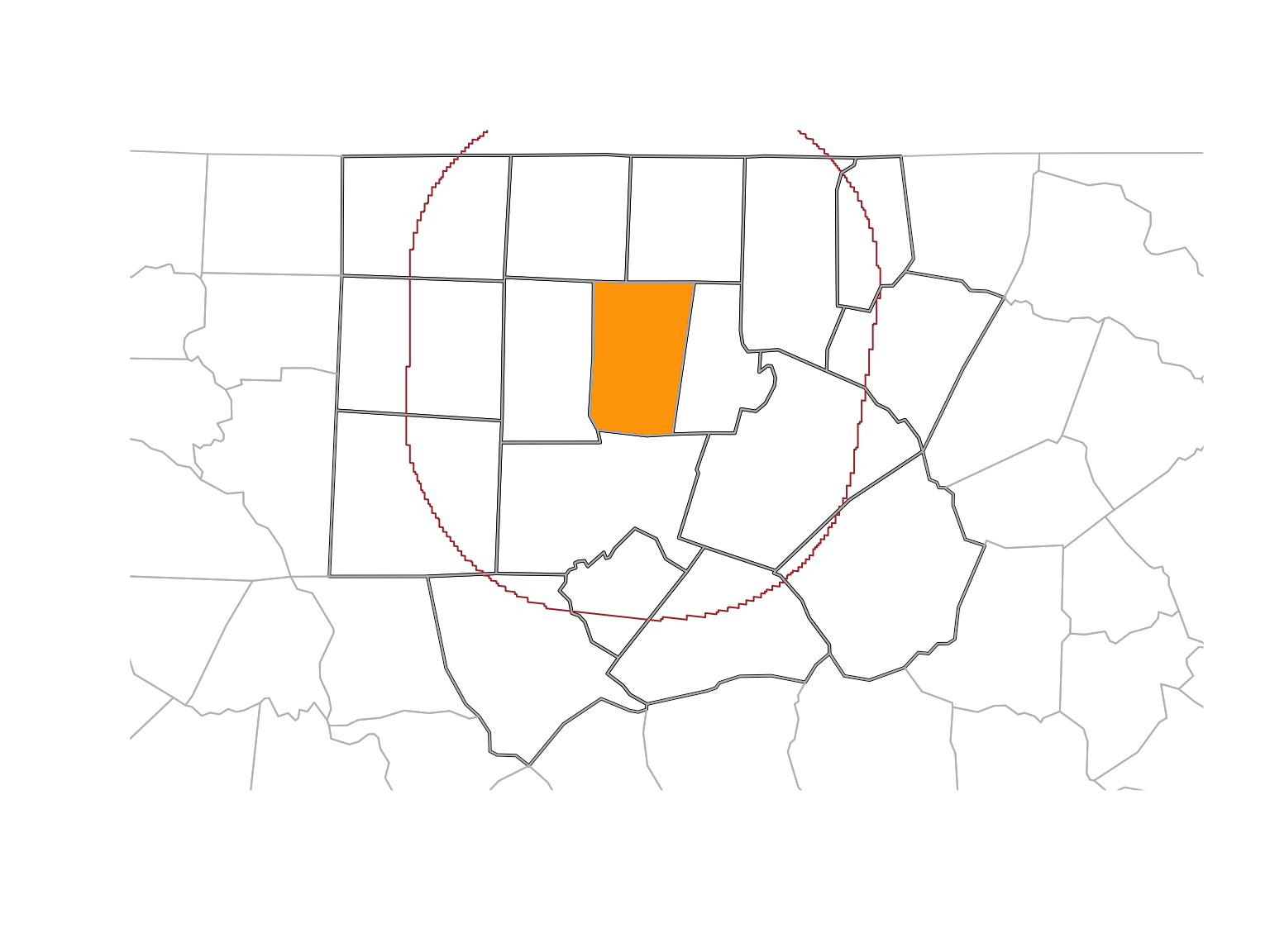
Select all counties less than 50 km away from Orange county:

orange <- nc |> dplyr::filter(NAME == "Orange")
wd <- st_is_within_distance(
    nc, orange, 
    units::set_units(50, km))

o50 <- nc |> dplyr::filter(lengths(wd) > 0)
nrow(o50)
[1] 17

Remember: The experession :: means accessing an object from a namespace (e.g. a function from a package)

Spatial joins

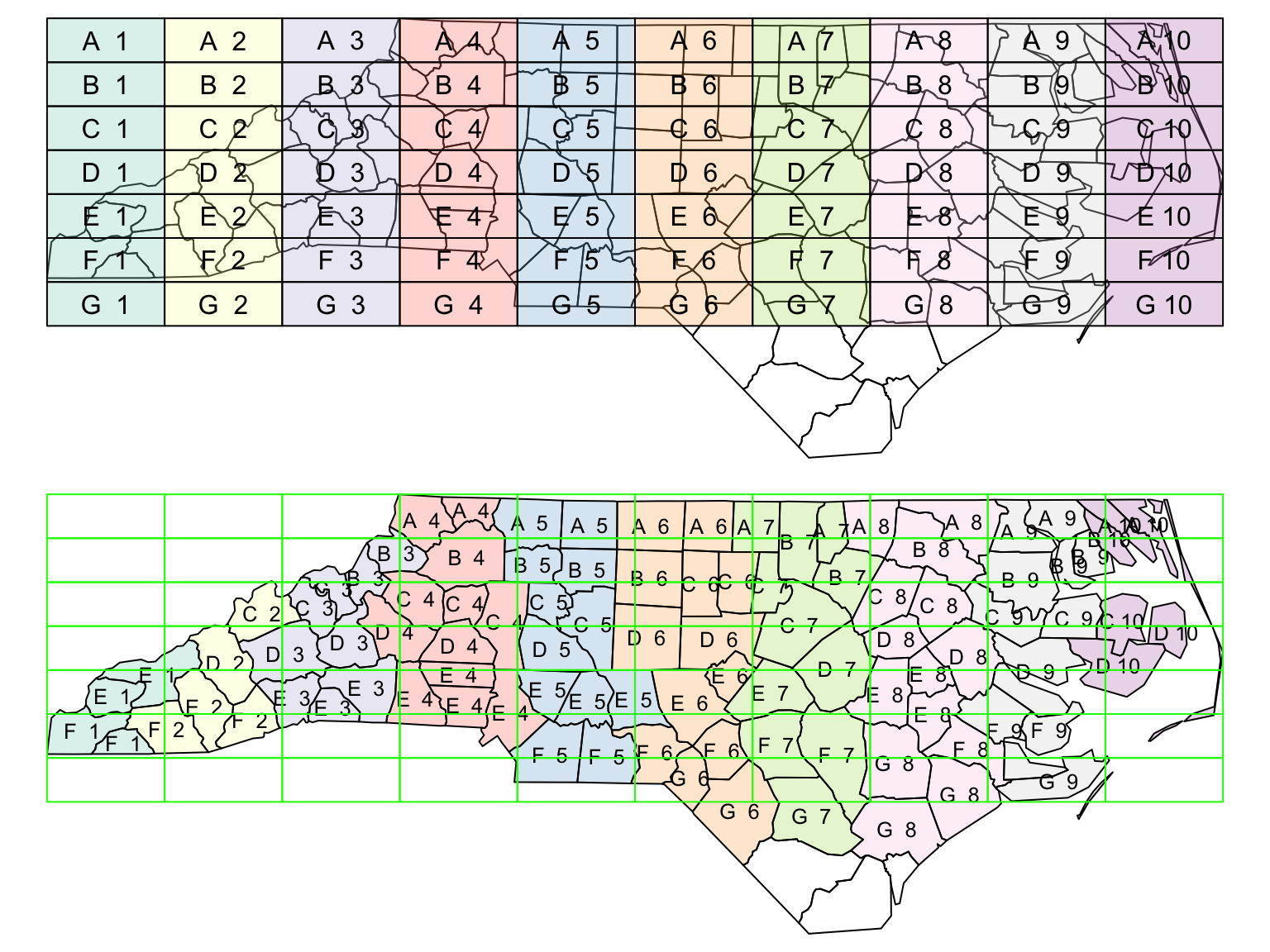
Work on spatial predicates instead of common columns. One needs to define spatially matching records

gr <- st_sf(
    label = apply(
        expand.grid(1:10, LETTERS[10:1])[,2:1], 1, 
        paste0, collapse = " "),
    geom = st_make_grid(nc))

gr$col <- sf.colors(10, categorical = TRUE, alpha = .3)

# cut, to verify that NA's work out:
gr <- gr[-(1:30),]

# spatial join
suppressWarnings(nc_j <- st_join(nc, gr, largest = TRUE))

# graphics
par(mfrow = c(2,1), mar = rep(0,4))
plot(st_geometry(nc_j))
plot(st_geometry(gr), add = TRUE, col = gr$col)
text(st_coordinates(st_centroid(st_geometry(gr))), labels = gr$label)
# the joined dataset:
plot(st_geometry(nc_j), border = 'black', col = nc_j$col)
text(st_coordinates(st_centroid(st_geometry(nc_j))), labels = nc_j$label, cex = .8)
plot(st_geometry(gr), border = 'green', add = TRUE)

Package sf

Sampling, gridding, interpolating:

  • st_sample: needs a target geometry
  • st_make_grid: square, rectangular or hexagonal grids
  • st_interpolate_aw: area values to new areas

Know your CRS, transform when needed, and be careful when performing calculations on planar versus spherical geometries!

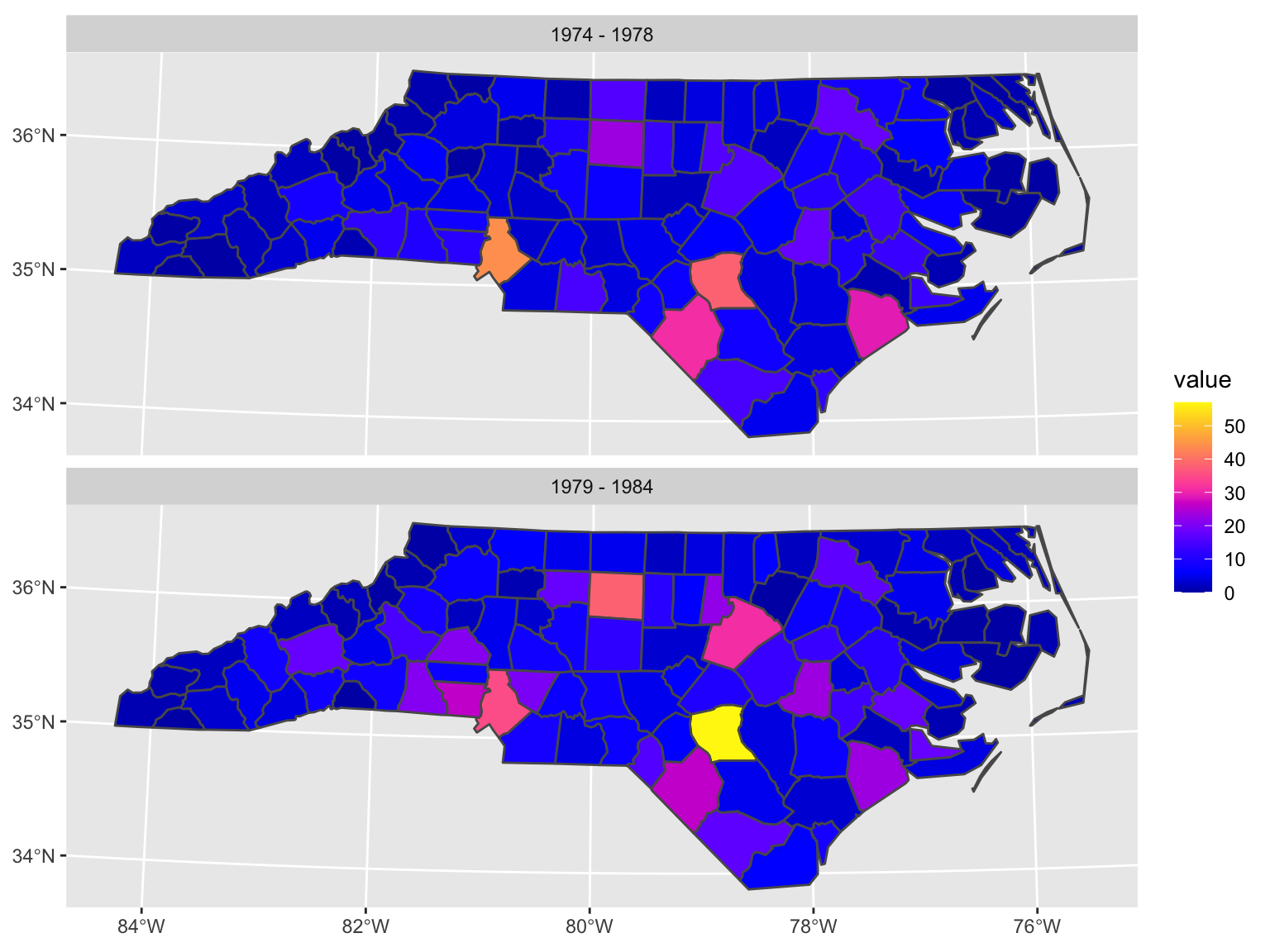
Visualizations

year_labels <- c(
    "SID74" = "1974 - 1978", "SID79" = "1979 - 1984")

nc_longer <- nc.32119 |> 
    select(SID74, SID79) |>
    pivot_longer(starts_with("SID"))

## Ggplot friendly but needs long format 
## objects to work with facets:

ggplot() + 
    # geom_sf undestands special features!
    geom_sf(data = nc_longer, aes(fill = value)) + 
    facet_wrap(~ name, ncol = 1, 
               labeller = labeller(name = year_labels)) +
    scale_y_continuous(breaks = 34:36) +
    scale_fill_gradientn(colors = sf.colors(20)) +
    theme(panel.grid.major = element_line(color = "white"))
Visualizations

library(mapview) |> suppressPackageStartupMessages()
mapviewOptions(fgb = FALSE)
nc.32119 |> 
    mapview(zcol = "BIR74", legend = FALSE, col.regions = sf.colors, cex = 0.5)

Advanced topics

  • Statistical model of spatial data
  • Point pattern analysis
  • Spatial interpolation
  • Multivariate and spatiotemporal geostatistics
  • Proximity and area data
  • Measures of spatial autocorrelation
  • Spatial regressions
  • Spatial econometric

Further reading

vignette(package = "sf") # see which vignettes are available
vignette("sf1") # an introduction to the package
vignette("sf2") # reading, writing and converting simple features
vignette("sf3") # manipulating simple feature geometries
vignette("sf4") # manipulating simple features
vignette("sf5") # plotting simple features
vignette("sf6") # miscellaneous long-form documentation
vignette("sf7") # spherical geometry operations

Exercises

Vector exercises

Low-hanging fruit

  1. Use the World Bank SDG data set downloaded last class
  2. Choose your favorite goal
  3. Make a map using tmap, ggplot and mapview
  4. Pro-challenge: rank countries according to how well are they performing. Map the ranking.

Tip: You need base map. Try map_data("world")